UPI Intent vs Dynamic QR: Which Payment Flow Is Better?
Compare UPI Intent vs Dynamic QR to choose the right UPI payment flow for your website, app or online store. Learn the benefits, limitations and integration options. Copy meta description
UPI Intent vs Dynamic QR: Which Payment Flow Should You Use?
Online payments have become an important part of running a website, mobile app or e-commerce business in India. Customers expect a checkout experience that is quick, simple and easy to understand. At the same time, businesses need a reliable way to collect payments and confirm whether an order has actually been paid.
This is where choosing the right UPI payment flow makes a difference.
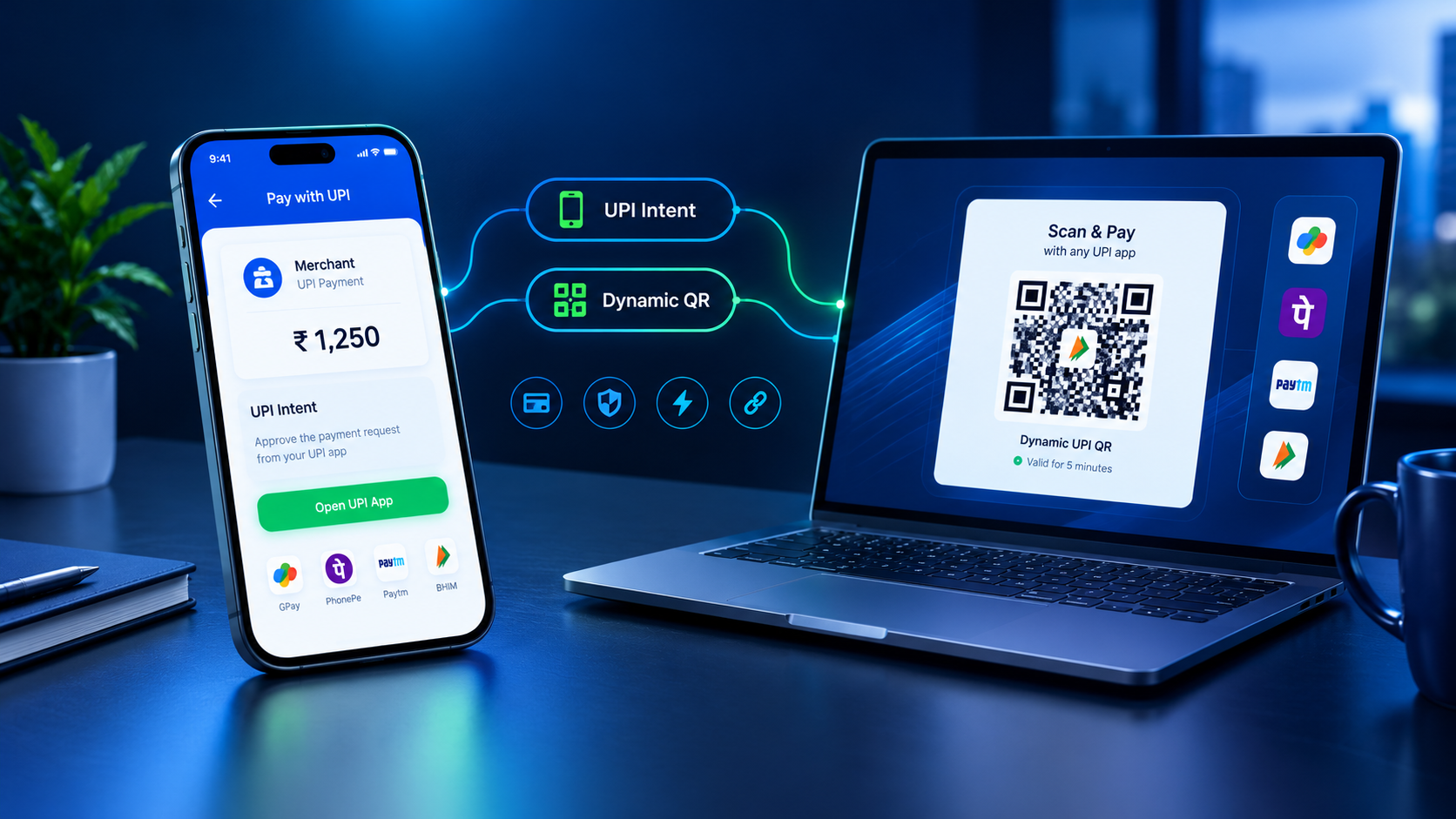
Two common options are UPI Intent and Dynamic UPI QR. Both allow customers to pay using UPI, but they work in different ways. UPI Intent can help customers move from checkout to a compatible UPI app, while Dynamic QR displays a payment QR code that customers scan using their UPI app.
So, which option should your business use?
The answer depends on where your customers make payments, which devices they use, how your checkout is designed and how your system verifies payment status.
In this guide, we will compare UPI Intent vs Dynamic QR, explain how each payment flow works, explore their advantages and limitations, and help you choose the right option for your website, mobile app or online store.
What Is UPI Intent?
UPI Intent is a payment flow that allows a website or mobile application to request a compatible UPI app to handle a payment. Instead of asking the customer to manually enter payment details, the checkout can open a supported UPI app with relevant payment information prefilled, where supported.
For example, suppose a customer is purchasing a product worth ₹1,499 from your mobile app. When the customer selects UPI Intent, the app may open a compatible UPI payment application with the merchant's payment details and amount ready for review.
The customer checks the details, authorises the payment and completes the transaction within the payment app.
Afterward, the merchant's system needs to verify the payment before marking the order as paid.
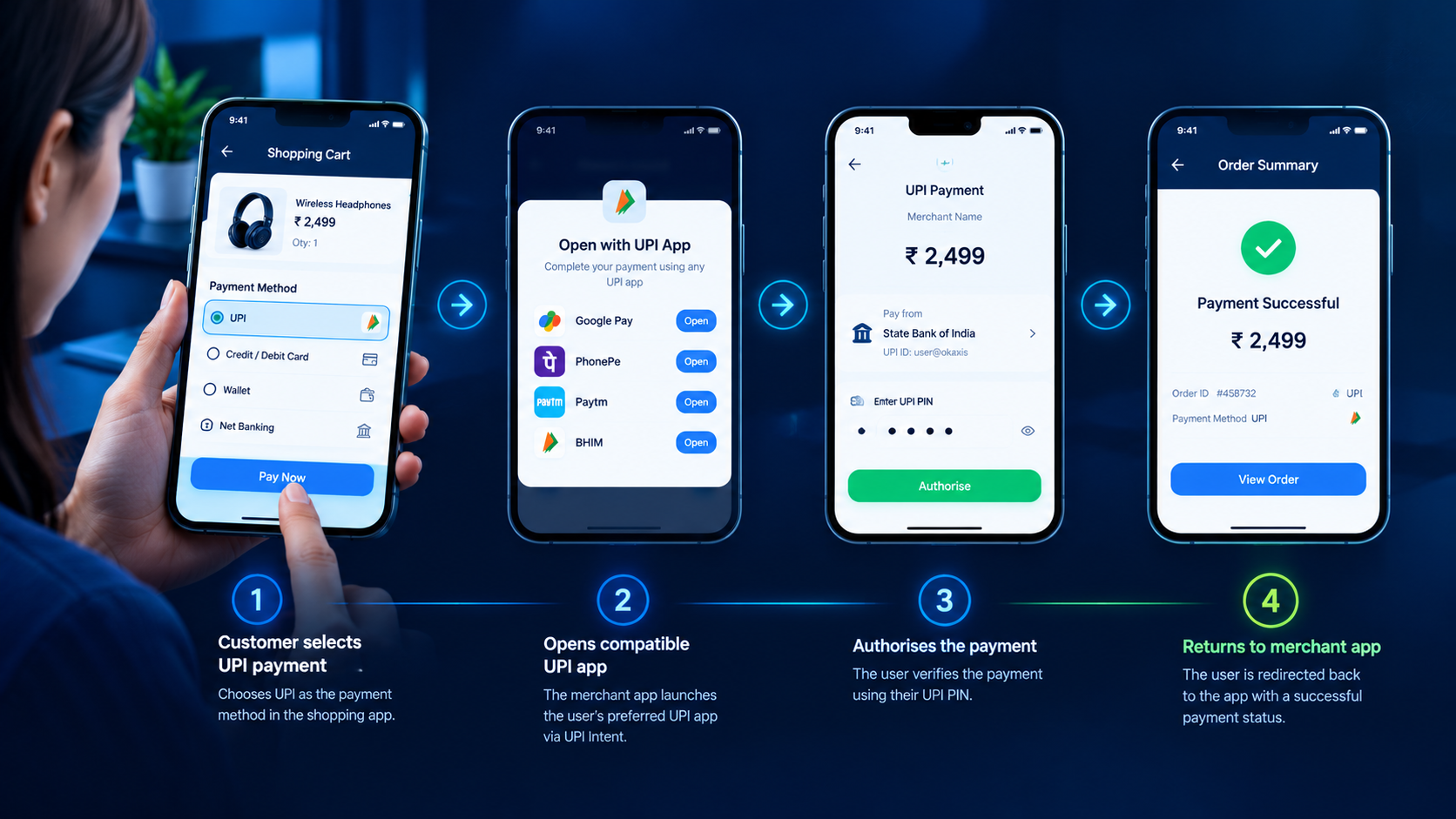
How UPI Intent works
-
A customer selects UPI at checkout.
-
Your website or mobile app initiates a supported UPI payment request.
-
A compatible UPI application opens, if available and supported.
-
The customer reviews the details and authorises the payment.
-
Your system verifies the actual payment status.
-
The order is updated according to the verified result.
UPI Intent is particularly useful when the customer is already using a smartphone and the checkout can open a compatible payment app.
However, the exact experience depends on the operating system, integration method and supported payment applications. Opening a payment app does not itself prove that the payment was successful.
What Is Dynamic UPI QR?
A Dynamic UPI QR is a QR code generated for a particular payment request. Depending on the integration, it can contain details such as the merchant's UPI address, the requested amount and other supported payment information.
Unlike a static QR code that may be reused for many payments, a dynamic QR can be generated separately for each order. This can make it easier to connect a payment with the correct order when the payment system supports suitable references and verification.
For example, a customer places an order worth ₹799 on your website. Your checkout generates a QR code for that payment request. The customer opens a UPI app on a phone, scans the code, checks the payment details and authorises the payment.
Your payment system then checks whether the payment has actually been received.
How Dynamic UPI QR works
-
The customer creates an order on your website or app.
-
Your backend creates a payment request for the order.
-
A Dynamic UPI QR is generated using the supported payment integration.
-
The customer scans the QR code using a compatible UPI application.
-
The customer reviews the details and completes the payment.
-
The system verifies the transaction and updates the order status.
Dynamic QR is useful when customers need to scan and pay, particularly during desktop checkout or when a separate device is available for scanning.
Keep in mind that generating a QR code is only one part of the payment flow. Your integration must also handle payment verification, pending transactions and unsuccessful payments properly.
UPI Intent vs Dynamic QR: Quick Comparison
The main difference is how the customer reaches the payment application.
| Feature | UPI Intent | Dynamic UPI QR |
|---|---|---|
| Payment method | Opens a compatible UPI app | Customer scans a QR code |
| Customer action | Selects a payment app and authorises payment | Opens a scanner, scans and authorises payment |
| Mobile checkout | Often a natural fit | Works when scanning is practical |
| Desktop checkout | May require a suitable cross-device flow | Often convenient with a phone scanner |
| Payment amount | Can be passed through supported payment parameters | Can be encoded in the QR payment request |
| Order tracking | Requires suitable payment references and verification | Requires suitable payment references and verification |
| App compatibility | Depends on supported apps and device behaviour | Depends on QR format and supported UPI apps |
| Payment confirmation | Must be verified by the merchant's system | Must be verified by the merchant's system |
| Best use case | App-based or mobile-first checkout | Web checkout, scan-to-pay and flexible checkout |
Important: Neither method automatically guarantees successful payment verification. A payment request, app-opening event, customer screenshot or return to the website is not sufficient proof that the merchant has received the money.
UPI Intent vs Dynamic QR: Which One Is Faster?
Many businesses compare these payment methods because they want customers to complete checkout with fewer steps.
UPI Intent can offer a convenient experience on compatible smartphones because customers may be able to move directly from checkout to a UPI app without manually scanning a code.
Dynamic QR also provides a straightforward payment experience, especially when the customer is browsing a website on a computer and can scan the displayed QR code using a phone.
However, there is no universal winner for speed.
The actual checkout time depends on the device, network connection, supported payment app, customer familiarity and whether the payment needs additional confirmation.
For a mobile app with a compatible UPI integration, Intent may feel more natural. For a desktop website, Dynamic QR may be more practical.
The best approach is to measure your own checkout completion rate, time to payment and number of abandoned payment attempts rather than assuming one method is always faster.
Advantages of UPI Intent
UPI Intent can be a good choice for businesses that want a smooth mobile payment experience.
1. Fewer manual steps
Customers may not need to switch applications manually, search for a merchant UPI ID or enter the payment amount themselves. Supported payment details can be passed through the payment request.
2. A mobile-friendly checkout
For mobile applications and mobile-first websites, launching a compatible UPI app can feel like a natural extension of the checkout process.
3. Convenient for app users
Businesses offering shopping apps, subscription services, digital products or other legitimate online services can consider UPI Intent when their customers primarily use smartphones.
4. Better integration with the checkout journey
Developers can design the payment flow around order creation, payment initiation, status verification and the final confirmation screen.
Limitations of UPI Intent
UPI Intent is not suitable for every device or environment.
-
A compatible UPI application may not be installed.
-
App availability and supported payment parameters can differ.
-
Redirects or returning to the merchant app may behave differently across devices.
-
The customer may cancel the payment or leave it incomplete.
-
The merchant must still verify the transaction independently.
For this reason, businesses should consider a fallback payment option instead of relying entirely on UPI Intent.
Advantages of Dynamic UPI QR
Dynamic QR is a flexible option for websites, online stores and applications that want to display a scannable payment request.
1. Convenient for desktop checkout
Imagine a customer browsing your online store on a laptop. They can view the QR code on the screen and scan it with their phone.
This avoids the need to open a payment app on the same device used for browsing.
2. A separate QR for each order
A dynamic QR can be generated for an individual order, with the requested amount and supported payment details included. This helps create a more organised checkout process than using a single reusable QR for every order.
3. Useful for multiple business types
Dynamic QR can be considered for e-commerce stores, service websites, digital product platforms and mobile applications where displaying a QR is practical.
4. Straightforward for customers who prefer scanning
Some customers are already familiar with scanning QR codes to pay. Displaying the code directly on the checkout page can make the payment process easy to understand.
Limitations of Dynamic UPI QR
Dynamic QR also has a few practical limitations.
-
Customers generally need a camera-equipped device or scanner to scan the code.
-
Scanning a QR displayed on the same phone can be less convenient.
-
The customer can scan the code without completing the payment.
-
Incorrect or outdated payment details can cause confusion.
-
Your backend still needs a reliable method to verify payment status and associate it with the right order.
A QR code is not a substitute for payment tracking. Businesses should design the complete payment flow, including status checks and handling of pending transactions.
Which Payment Flow Is Better for a Website?
If you operate a website, your decision should start with understanding how visitors access your checkout.
Choose UPI Intent when:
-
Most visitors use smartphones.
-
Your integration supports launching compatible UPI apps.
-
You want to reduce manual entry of payment details.
-
You can handle app switching, cancellation and payment verification.
-
You have a suitable fallback for unsupported devices.
Choose Dynamic QR when:
-
Many customers shop on desktop or laptop computers.
-
Customers can scan the QR using another device.
-
You want to generate a separate QR for each order.
-
You need a visible payment option on the checkout page.
-
Your backend can track and verify each payment request.
For a website with both desktop and mobile traffic, supporting both options may offer a better experience than forcing every customer into the same flow.
For example, a customer on a laptop could be shown a Dynamic QR, while a mobile customer could be offered a compatible UPI Intent option. This depends on your integration capabilities and should be tested on real devices.
Which Payment Flow Is Better for a Mobile App?
For a mobile application, UPI Intent is often a sensible option to evaluate first because it can allow customers to move from the app to a compatible UPI application.
Consider a shopping app where a customer adds products to the cart and proceeds to checkout.
With a supported UPI Intent flow, the customer selects UPI, opens a compatible payment app, authorises the transaction and returns to the shopping app.
However, your app should not automatically mark the order as paid just because the customer returns from the UPI application.
The payment may have succeeded, failed or remained pending. The app should obtain the verified status from your backend and display the correct result.
Dynamic QR can still be useful in mobile apps, especially where customers have another device available or where the product experience specifically supports scanning.
For most mobile-first use cases, the practical decision is to evaluate UPI Intent as the primary option and retain QR or another supported payment method where it adds value.
Can You Use Both UPI Intent and Dynamic QR?
Yes. A business can design its checkout to offer both payment flows, provided the underlying payment integration supports them.
Using both options allows customers to choose a method that fits their device and preferences.
For example:
-
Mobile visitor: Show a compatible UPI Intent option.
-
Desktop visitor: Display a Dynamic UPI QR.
-
Unsupported device: Provide an appropriate alternative payment method.
-
Payment pending: Allow the customer to check the transaction status without creating duplicate orders.
A combined flow can be useful for e-commerce businesses, SaaS platforms, mobile apps and other online services.
However, offering two payment options does not automatically improve conversion. It is important to test whether both methods are actually used and whether they reduce friction for your customers.
The payment system should also handle duplicate callbacks, repeated status checks, abandoned sessions and delayed confirmations consistently.
How Does Automated Payment Verification Work?
Choosing the right customer-facing payment method is only one part of building a reliable UPI checkout.
The second part is confirming that the payment was actually completed.
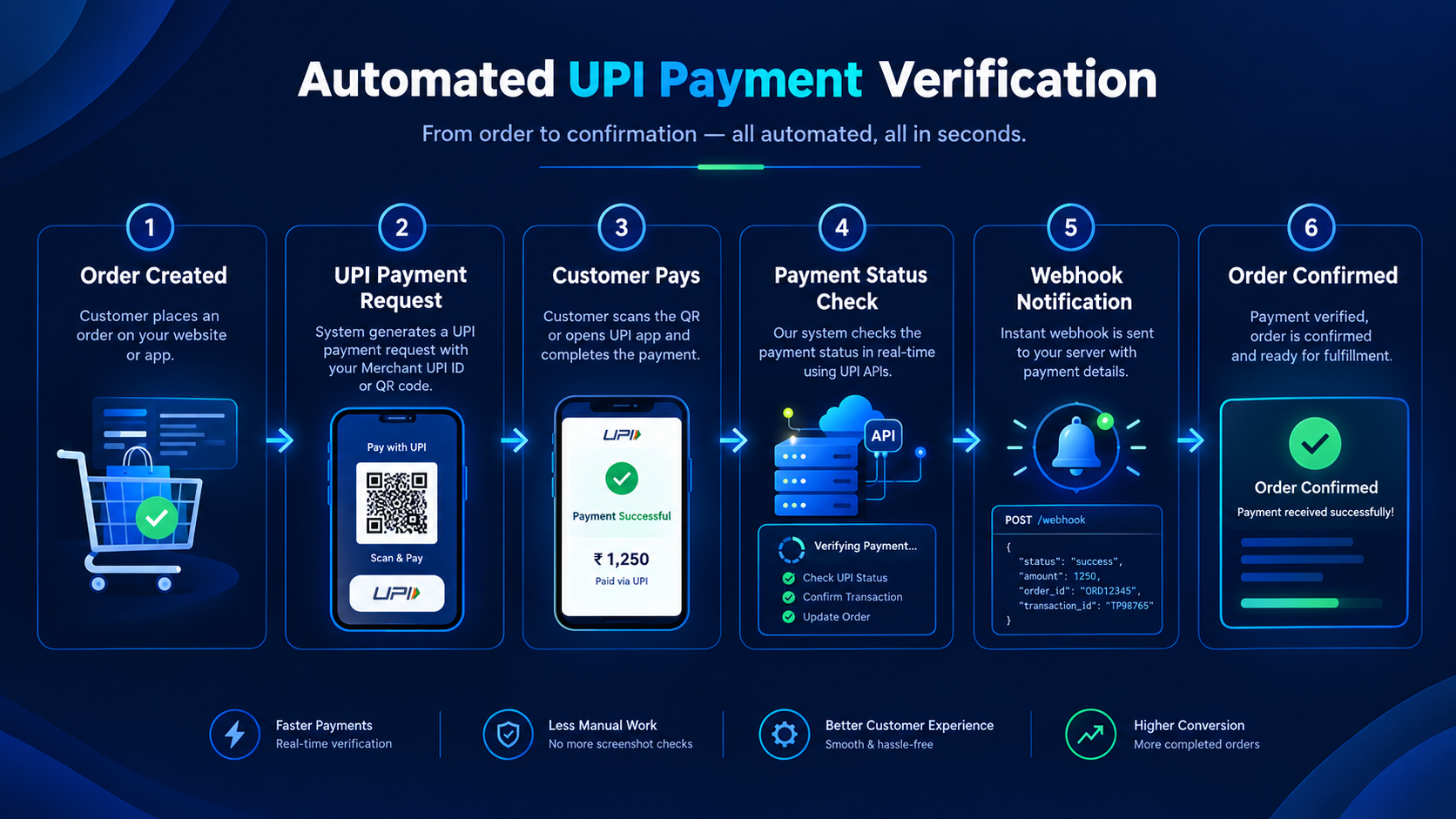
A typical automated payment verification flow works like this:
-
Create an order: Your website or app creates an order with a unique reference.
-
Create a payment request: Your backend generates the supported UPI Intent request or Dynamic QR.
-
Wait for the payment: The customer attempts to complete the transaction through their UPI app.
-
Verify the status: Your system checks the transaction using its supported payment-status mechanism.
-
Update the order: The backend marks the order paid only after the payment is verified.
-
Notify your application: Where supported, an API response or webhook can communicate the updated status.
A well-designed integration should also account for pending transactions, failed payments, duplicate notifications and delayed updates.
For example, if a customer pays but the confirmation takes a few seconds to arrive, the website should not immediately create a second payment request or mark the order as failed without checking its status.
Payment verification methods depend on the connected merchant setup and the capabilities of the payment infrastructure. Developers should confirm that their provider supports the required status-checking and notification features before building around them.
Dynamic QR vs UPI Intent: What About Transaction Fees?
Transaction fees are another factor businesses should consider when selecting a UPI payment solution.
The cost depends on the connected merchant arrangement, the payment infrastructure and the pricing terms of the service being used.
Some UPI-focused automation platforms may charge a setup fee, subscription fee or fixed service fee instead of a percentage-based platform fee. However, this does not mean every underlying transaction is necessarily free of charges.
Before integrating a UPI Gateway, confirm:
-
Whether the platform charges a setup or subscription fee.
-
Whether there is a percentage-based platform transaction fee.
-
Whether any merchant, bank or third-party charges apply.
-
Whether payment verification, API calls or webhooks have usage limits.
-
Whether refunds, reversals and failed transactions have separate terms.
If you are comparing two payment flows offered by the same provider, check whether their pricing differs. The QR or Intent method alone does not determine the total cost.
Businesses should always review the applicable pricing and merchant terms rather than assuming that a payment method is free simply because it uses UPI.
How to Choose a UPI Gateway for Your Business
Whether you select UPI Intent, Dynamic QR or both, the underlying UPI Gateway should support the needs of your business.
Look for a solution that provides:
Dynamic UPI QR generation
The ability to create payment requests for individual orders, with appropriate payment details and references.
UPI Intent integration
Support for launching compatible UPI payment applications using the relevant integration method.
Payment status API
A documented way to check payment status from your backend.
Webhooks and notifications
Where supported, payment notifications can help your application update orders without relying only on the customer returning to the checkout page.
Website and app compatibility
Choose an integration suitable for your technology stack, devices and checkout design.
Developer-friendly documentation
Clear API references, integration examples, error handling guidance and testing procedures can reduce development time.
Transparent pricing
Understand the full fee structure, limitations and applicable merchant requirements before going live.
Merchant account and settlement clarity
Confirm which merchant account receives the payment, how settlement works and which party is responsible for payment records and compliance.
The right UPI Gateway should help you build a practical payment flow without adding unnecessary complexity to your checkout.
How UPI-Gateway.in Can Help
UPI-Gateway.in focuses on UPI payment collection and automation for businesses that want to connect supported merchant payment setups with their websites or applications.
Depending on the features available under the selected integration, businesses can explore options such as Dynamic UPI QR generation, UPI payment requests, payment status APIs and automated payment verification.
The goal is to help developers and businesses build a more organised payment workflow without unnecessary manual steps.
For example, an online store can create an order, present an available UPI payment option, check the payment status through the supported integration and update the order after confirmation.
Before choosing an integration, businesses should review the available features, supported merchant setup, pricing and technical requirements.
Want to explore a UPI payment flow for your website or app? Visit UPI-Gateway.in to learn more about the available UPI Gateway integration options.
CTA: Get Your UPI Gateway | Start UPI Integration
Common Mistakes to Avoid When Implementing UPI Payments
Even a well-designed checkout can create problems if the underlying payment logic is incomplete.
Here are some common mistakes to avoid.
1. Treating a payment screenshot as confirmation
A screenshot or payment-success screen shown by the customer is not reliable proof that the merchant received the payment. Verify the transaction using the supported payment-status mechanism.
2. Marking an order as paid too early
Opening a UPI application, scanning a QR code or returning to the website does not confirm payment. Update the order only after verifying the result.
3. Ignoring pending transactions
Some payments take time to reflect in the merchant's system. Provide a clear pending status and a way to check again instead of immediately asking the customer to pay a second time.
4. Using the same payment reference for unrelated orders
Unique order and payment references help your backend connect transactions with the correct checkout session.
5. Assuming every UPI app behaves the same way
Payment applications, operating systems and integration methods can behave differently. Test your payment flow across the devices and apps you intend to support.
6. Forgetting the fallback option
If Intent cannot open a compatible app or the QR flow is inconvenient, customers should have a suitable alternative where possible.
7. Failing to test webhooks and duplicate events
Your backend should handle repeated notifications safely and avoid fulfilling the same order multiple times.
These details may not be visible to customers, but they are essential for a dependable payment experience.
Frequently Asked Questions
1. What is the difference between UPI Intent and Dynamic QR?
UPI Intent allows a website or app to initiate a payment flow through a compatible UPI application. Dynamic QR displays a scannable payment request that customers can open using a compatible UPI app.
2. Is UPI Intent better than Dynamic QR?
Neither is always better. UPI Intent is often a good fit for compatible mobile checkout experiences, while Dynamic QR can be convenient for desktop checkout and scan-to-pay scenarios.
3. Can I use Dynamic UPI QR on my website?
Yes, a website can display a Dynamic UPI QR when its payment integration supports QR generation. Customers can scan the code using a compatible UPI application.
4. Can I integrate UPI Intent into my mobile app?
Yes, if your app and payment integration support the relevant UPI Intent flow. You should also handle cases where no compatible app is available, as well as cancellation and payment-status verification.
5. Can a UPI Gateway support both Intent and Dynamic QR?
A UPI Gateway can support both options if those features are available in its integration. Confirm the provider's current documentation and compatibility before implementation.
6. Is Dynamic UPI QR free?
The QR generation method itself does not determine the total cost. Charges depend on the provider's pricing, merchant arrangement and any applicable third-party fees. Review the terms before integrating.
7. How do I verify a UPI payment automatically?
Your backend should use the supported payment-status API, transaction verification mechanism or payment notifications provided by the integration. An app redirect or customer screenshot should not be treated as sufficient confirmation.
8. Which UPI payment flow is suitable for Shopify?
For a Shopify store, the suitable option depends on the integration method supported by Shopify, the payment provider and your store configuration. Check whether the provider offers a compatible Shopify integration before selecting Intent, QR or both.
9. Can Dynamic QR work for mobile and desktop users?
Yes, but the customer experience differs. Desktop users can scan a code displayed on their screen with a phone. Mobile users may need a second device or another supported payment option.
10. Does UPI Intent guarantee successful payments?
No. Intent initiates a payment flow but does not guarantee that the customer will authorise or complete the transaction. The merchant must verify the actual payment status.
Final Verdict: UPI Intent or Dynamic QR?
The right choice depends on your customers and your checkout environment.
Choose UPI Intent when you want a convenient mobile payment flow through compatible UPI apps. Choose Dynamic UPI QR when scanning a payment request is practical, particularly for customers shopping on a desktop or laptop.
If your business serves both mobile and desktop visitors, supporting both can provide more flexibility, provided your payment infrastructure supports them.
Most importantly, don't focus only on how a customer starts a payment. Build a complete flow that includes payment initiation, secure backend verification, correct order updates and proper handling of pending transactions.
A smooth checkout helps customers pay with less friction. Reliable payment verification helps your business manage orders accurately.
If you're planning to accept and automate UPI payments on your website, mobile app or online store, explore the available integration options at UPI-Gateway.in and choose a setup that fits your technical requirements.
Ready to connect UPI to your checkout?
JaduPe provides current service, eligibility and plan details. Review them before you begin.
Explore JaduPe ↗Related articles.

Free UPI Gateway: How Businesses Can Accept UPI Payments at Low Cost
Looking for a free UPI Gateway to accept online payments without expensive transaction charges? Discover how businesses can use Dynamic UPI QR Codes, UPI Intent, Merchant UPI IDs and payment APIs to simplify UPI payment collection and automate payment verification at a lower cost.
Read article →
UPI Gateway: Complete Guide for Businesses in 2026
Learn what a UPI Gateway is, how it works, and explore Dynamic QR, UPI Intent, payment APIs, automated verification and integration for online businesses.
Read article →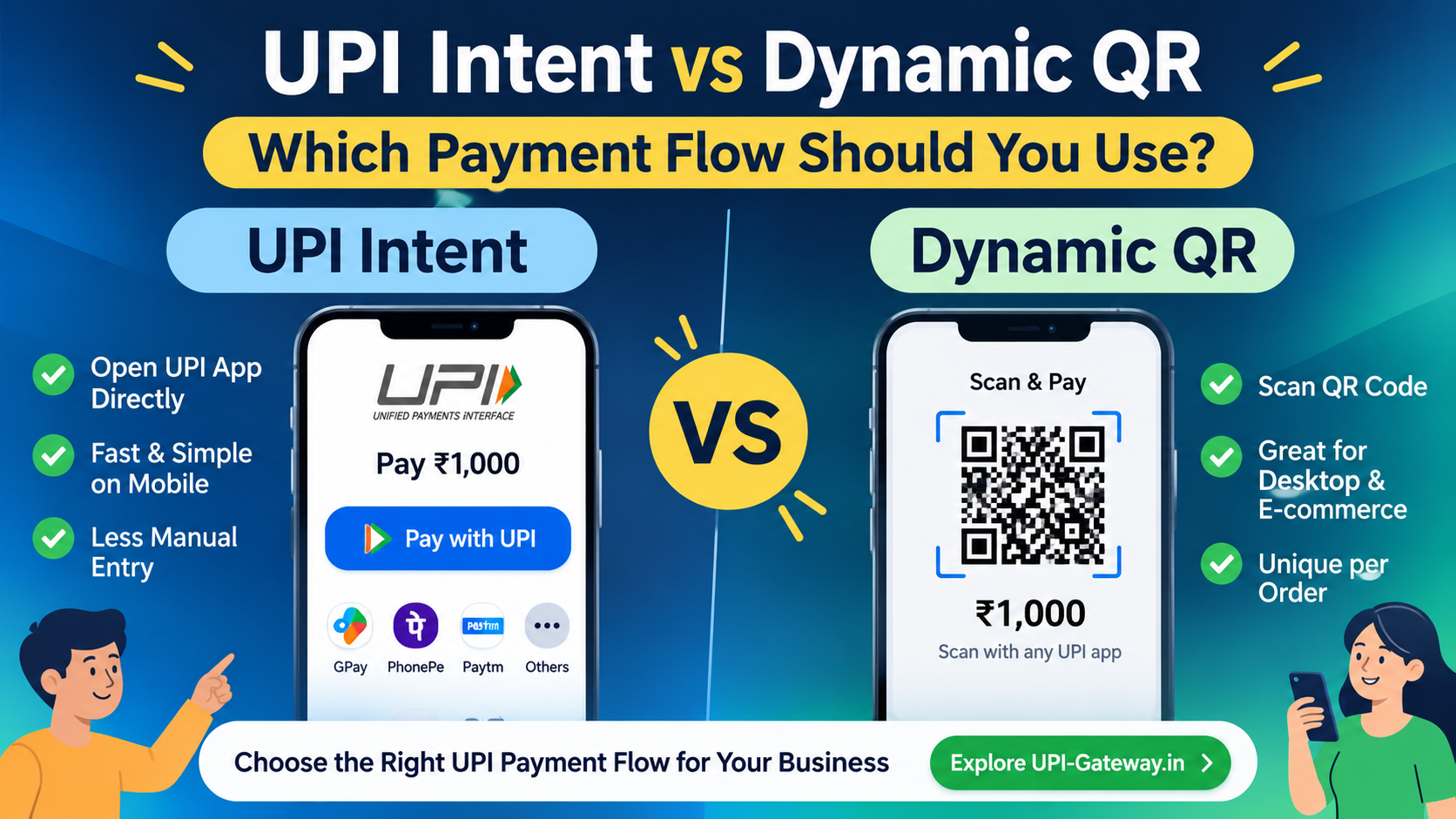
UPI Intent vs Dynamic QR – Choose the Right Payment Flow
Should your business use UPI Intent or Dynamic QR? Understand the differences, benefits and payment integration options for online businesses.
Read article →